Shortcuts and triggers, explained
Learn where an alias matches, what Space does, and when the optional Tab, Enter, or immediate triggers need extra care.

Start with a short acknowledgement, save it with a memorable alias, and test it before using it in a real conversation.
Use wording that does not promise a deadline, refund, or outcome. A simple acknowledgement is easy to verify and useful in several contexts. Keep private details out of your first test.
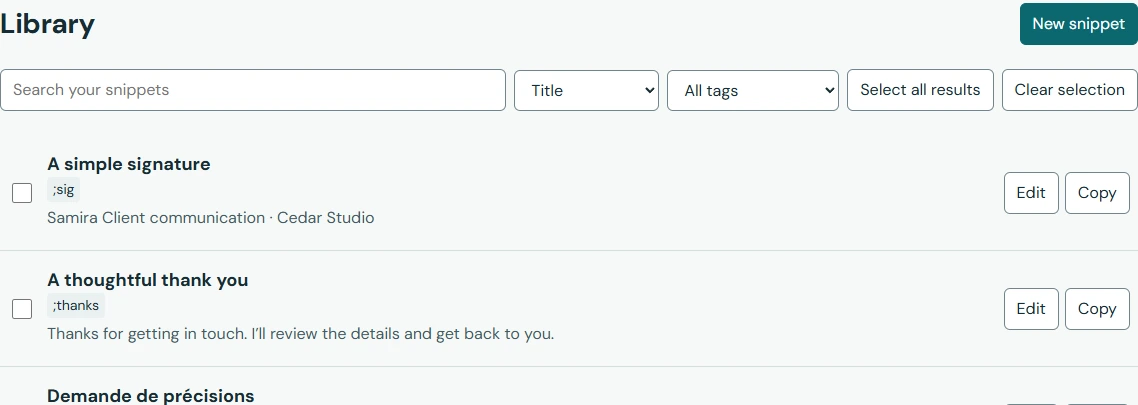
Thanks for getting in touch. I’ll review the details and get back to you.
The current extension uses English or Arabic interface labels. The steps below refer to the English interface. You can edit the example text in any supported writing language.
Open Help & practice and expand Test a saved shortcut. Type ;thanks followed by Space. Check that the whole reply appears and a single trailing space remains. Pasting the alias is not the same test.
If the alias conflicts with an existing one, choose a different alias and save again. If practice works but a website does not, check website access, pause settings, and the snippet’s scope. Do not repeatedly trigger an uncertain insertion.
Give the snippet a folder or tag only if it helps you find it. Add it to favorites if you use it often. Before sending a real reply, edit the details for the recipient.
Export an independent backup once you have a few useful snippets. Adding a field is a good next step when the same part of your reply changes each time.
Return to All snippets and search for the title. You should see the saved reply and ;thanks together. If you see an unsaved draft, reopen it and choose Save snippet. If the practice reply is the old version, verify which alias and library item you edited. A saved change and a draft are different states.